
Open source means the freedom to modify and share.
Why Open Source?
Control
Don’t like something? Change it or get someone else to change it for you. Customise appearances, add missing features, remove ones you don’t like.
Open source means full control to do whatever you please, limited only by imagination, skill and time.
Stability
Proprietary products lives only as long as the company that owns it.
Open source projects live as long as someone is interested in maintaining it. This is why most long-term critical projects are created on top of open source projects.
Progress
When companies sit on patents and do nothing, it halts the progress of humanity.
Did you know that 3D printing was invented in the 80s but only started becoming a thing in the 2010s after a bunch of patents expired? Imagine how advanced we’d be as a species if more things were open sourced.
Security
As a consumer, when a company describes their proprietary software as secure, we just have to take them at their word. All we can do is wait until some researchers publish vulnerabilities or malicious hackers get caught.
On the other hand, open source software can be audited by anyone (with the relevant knowledge) at anytime. While not a complete guarantee, more popular an open source project is, the experts are looking at it, so even non-programmers can be fairly confident in their security. Many projects are even backed by huge companies as well, granting the support of their huge talent pools due to vested interest.
Community
As a creator, making a product open source gives you access to the talents of the community rather than limiting yourself to your own skills. You can also get more thorough feedback on internal features you may have personally overlooked.
How I Open Source my Work
I like to publish as much of my work as I can under GNU General Public Licence 3. It makes sure that my work stays open source while still letting other people use it as they see fit, plus I get credited. The following summary is adapted fromTLDR Legal Summary.
Can
- Use for commercial purposes
- Modify
- Share
Cannot
- Sublicense
- Hold liable for damages
Must
- Link to original
- State changes made
- Share under same license
Open Source Projects I Use
Linux

Linux is probably the most famous most successful open source projects of all time. It’s a family of operating systems that run the Linux kernel.
Technically, everyone uses Linux. Almost all web servers run it. Most phones and cars run Android which is built on Linux.
Fun fact that surprised me: Linux was made in 1991. I thought it’d be much older.
Bazzite

The specific Linux distro I run on my PC and laptop is Bazzite. For a long time, I used to run Linux Mint and I’ve tried then gave up on installing Arch Linux.
When Valve was developing SteamOS for their Steam Deck, they created, contributed and sponsored multiple open source projects. SteamOS itself is open source as are its compatibility tools like Proton and DXVK; so is its desktop environment KDE Plasma. Not only did Valve manifest the long prophesied Year of Linux Gaming by making most games launch out of the box, when they began working with other manufacturers and proved superior to Windows, Microsoft was forced to cobble together a less bloated system in panic.
Bazzite is a SteamOS alternative that’s compatible across more devices. It’s built on Fedora instead of Arch Linux like SteamOS, so I’m not compelled to talk about it all the time.
It’s the perfect for my Framework 12 laptop because it’s officially supported. Everything just works out of the box (which isn’t always a given because most laptops are built for Windows). All the laptop function keys work, the touchscreen and stylus support is flawless, tablet mode rotates properly and the suspend is better than any Windows laptop I’ve used before. Just like the Steam Deck, it actually turns the computer off instead of just overheating when I close the lid and I can pick up exactly where I left off.
It’s also just a solid gaming experience on my PC as well.
Airgradient
Airgradient is an open source air quality monitor that lets me know whether my room contains unhealthy amounts of carbon dioxide and air pollutants.
I own an Airgradient One and at first, I was honestly shocked by how much brain damage I take whenever I shut my door. My room has terrible ventilation and it often gets dangerously high in CO2, not to mention all the soldering and cleaning chemicals I use. I highly recommend getting one and looking after your brain and lungs.
GIMP

I’m not a Photoshop power user so I’ve never encountered a feature I need from a photo editor that GIMP doesn’t have. If your employment doesn’t force you to haemhorrage money into an Adobe subscription, it’s perfectly adequate for most people’s needs. Plus, they won’t use your work to train AI.
GrapheneOS

Simply put, GrapheneOS is Android with all the Google spyware taken out. Ironically, it’s only available on Google Pixel devices because of a number hardware requirements I don’t quite understand. It’s endorsed by the man who needs the strongest OPSEC in the world (Operations Security btw).
I like the fine control I get over my privacy settings. When apps ask for storage permissions, I can choose which specific folders it can access instead of giving it full reign over my whole phone. I’m not forced to have all the spyware apps you can’t delete on my phone like Assistant and Chrome. While I still have to use a sandboxed version of Google Play Services for some of my apps, I don’t have to give Google full control of my phone, read my text messages, use my camera, see my location etc. Also I think the PIN scrambling feature is really neat. I do have to give up on a few features like the fingerprint scanner and a lot of the AI features, but I think it’s worth the security benefits.
LibreOffice

I went to primary school in the Microsoft Office generation and highschool in the Google Docs generation. When I went to uni though, I switched to LibreOffice.
I’ll be the first to admit that unlike a lot of things on this list, LibreOffice feels like a bootleg of its proprietary counterparts because it’s very bare bones. But it’s compatible with Microsoft Office files, doesn’t require the cloud, it’s private, costs no subscription and has everything I really need form a productivity suite.
OBS

Just like Audacity, OBS Studio has become a bit of an industry standard for screen recording and streaming, although many professionals use commercialised forks such as Streamlabs. It’s sponsored by many big companies like YouTube, Twitch and a variety of hardware manufacturers. It’s simply the best in its class, a huge open source success story, and I have no notes.
Pinecil
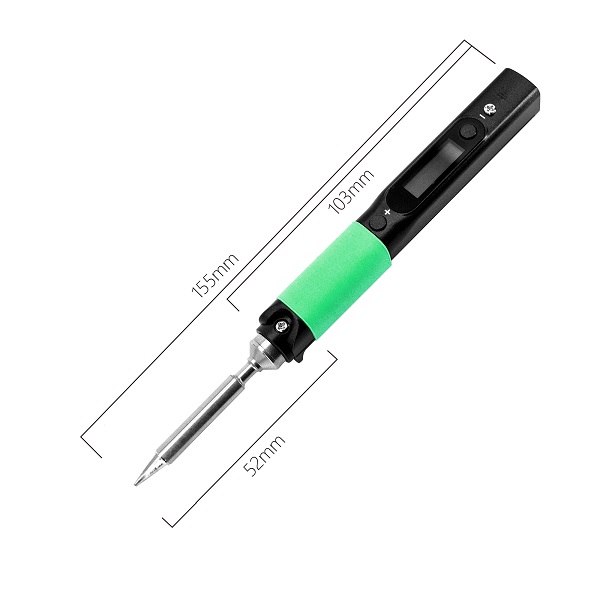
My dad had 2 constant-wattage soldering irons that I used to use growing up and the tips of those had eroded so much, they were concave. When I was finally old enough to spend some real money on a soldering iron, I did a bit of research and found glowing reviews about the Pinecil.
The Pinecil is a portable soldering iron with computer controlled temperature, sleep modes, motion detection that can be powered by a DC barrel jack or USB-C. It’s compatible with TS100 soldering tips which are a really popular standard; there’s little worry that they’ll go out of production and there’s a huge variety of them for different niches as well. Using such a light and small iron with temperature control is a completely different world. Also, the hardware and software (it runs RISC-V) is open source.
If you get one as well, I highly recommend swapping out the top screw (used to retain soldering tips) with a M2x4 thumbscrew. It’s a very popular mod that ought to be incorporated. I also recommend getting a variety of tips; there’s nothing quite like using the right tool for the job.
qBittorrent

qBittorrent is an open source alternative to µTorrent. It’s fully featured without a subscription and highly customisable. I couldn’t imagine using another client for sharing Linux ISOs.
Shotcut

I’ve tried bigger fancier video editors like DaVinci Resolve, but I’m a simple person with simple needs. Shotcut is very bare bones but it’s got everything I even know how to use in a video editor. I use it to convert videos into gifs for all the images on this website and to cut the rare YouTube video.
Voron

Voron is not a 3D printer company, it’s an open source project and team of engineers that design production quality 3D printers (and CNCs in the near future) that can be built with off-the-shelf components. Parts can be self-sourced but due to its popularity, plenty of kits are available from 3rd party vendors. The open source nature of these printers means they can be maintained by their owners instead of being at the mercy of a manufacturer; hardware can be modified with plenty of community designed mods and software can be customised without permission from some one else. Also worth noting is that Voron’s are kind of the Arch Linux of 3D printing; Voron owners are very proud and will often answer any complaint someone has with their commercial printer with a variation of “build a Voron“.
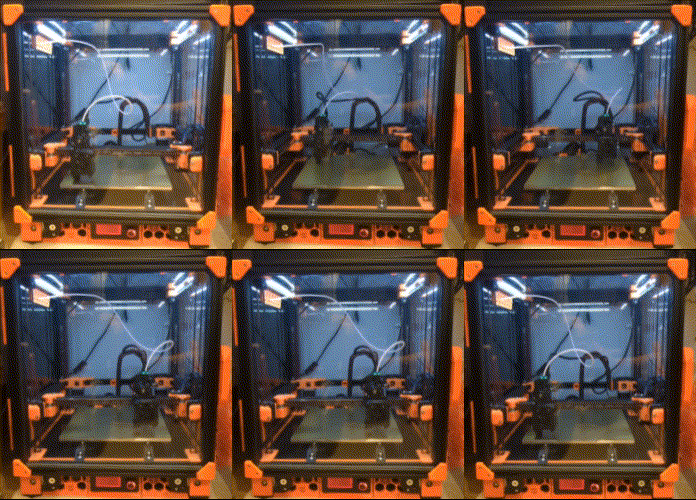
My (currently only) 3D printer is a Voron 2.4 I named Aitonina (follow the link to learn more). At the time I built my printer, it was the highest quality printer I could afford at the time though it’s now been eclipsed by many companies which have undoubtedly benefited from its development (Voron really popularised CoreXY). Aitonina isn’t perfect, but I like that I assembled her down to every nut and bolt so I know her inside and out. If there’s ever a problem, I can fix it myself and never have to worry about Voron going out of business or dropping support for it.
If you choose to build one yourself, I’d recommend going with the Voron Trident. It’s simpler and cheaper than the V2.4 with the same motion system as Bambu Lab’s printers. While building a Voron is no longer a great value for money, it’s a very rewarding experience and a fun community. Also, maybe I’m biased because I’ve always been putting things together (though more often taking things apart), but I think people saying that building printers is really difficult is overblown. The official Voron documentation and build instructions are really well done and if you’re capable of putting IKEA furniture together, you should be able to figure it out; just make sure to follow the instructions carefully. Community mods, however, are not as well documented and will often require some problem solving.
Git

Git was created specifically for the development of Linux. It’s a version control software that has kind of become the only one that anyone ever bothers using. Anything that requires a team of programmers to work on, or even solo developers working on complicated projects, will use Git.
Not to be confused with Github which is a proprietary platform that hosts projects made with Git.
Blender

One of the greatest success stories of open source software, Blender is a 3D graphics software that features everything from modelling to animation. For indie game developers and film makers, it’s impossible to beat in value for money (it’s free) but in recent years, it’s becoming a real competitor to animation industry standards and many productions are moving towards it. In 2025, Zilbalodis’ Flow, a film made completely in Blender, won the Academy Award for Best Animated Feature. Thanks to it’s open source nature, it’s available on all operating systems and is constantly getting new and exciting features.
Audacity

Audacity is the world’s most popular audio editing and recording app (according to their website). It’s beloved by everyone from musicians to podcasters to researchers from many academic fields, thanks to its capable signal analysis tools. This open source project is so successful, I think most people couldn’t even name a commercial competitor; it’s that good.
Currently, I don’t need an audio editor often, but Audacity is perfect for when I need to edit a ringtone or record the odd voiceover.
Since the 2020s, the team has had a huge restructuring of leadership and there’s been a massive redesign and development effort. Its future is looking more exciting and brighter than ever.
Godot

When I first got into game development, I learnt Unity like everyone else in the 2010s. In light of the 2023 fees fiasco, as well as my Unity knowledge getting rusty anyway, I was inspired to try out other game engines.
Godot was a really popular option at the time because it was open source. This means that any games made using the Godot engine were completely owned by the developer, no game engine fees ever.
Personally, I was really impressed by just how lightweight it was. Unity created a separate launcher just like every major game publisher and just like those AAA titles, created a really bloated program that takes a few minutes just to boot up. Godot on the other hand was a single executable that opened up within a second or 2. Snappy and responsive.
When my favourite Unity tutorial YouTuber, who helped me take my first steps into game development, came out of retirement just to make a Godot Tutorial, I knew I made the right choice. As a feature complete game engine that supports 2D/3D and even VR, that runs buttery smooth and has an ever growing community around it, I think it’s the perfect choice for any beginner as well as a solid choice for experienced game developers.
Inkscape

I’ve never tried any other vector graphics editors but I love using Inkscape. I use it for laser cutting as well as general vector design. It’s also great for making mockups comparing 2D dimensions when I don’t feel like opening up CAD.
LibreWolf

Today, there are only 2 browser engines: Gecko (Mozilla‘s Firefox) and Chromium (everything else). While Firefox is generally better for privacy because Gecko doesn’t come with Google spyware, the non-profit Mozilla Foundation has been making a lot of controversial decisions in order to make money and stay afloat. Note that Gecko, Firefox and even Chromium are open source.
LibreWolf is a open source fork of Firefox focused on privacy. I like to have more control over my personal data and since it’s built on the same engine, I still have access to all the Firefox Addons (browser extensions) (and I only use open source ones).
Organic Maps

Organic Maps is an open source offline navigation app that uses data from OpenStreetMap (which is a crowdsourced open map database, kind of like Wikipedia).
Most people don’t realise that their maps app on their phone doesn’t NEED an internet connection (even Google Maps supports offline maps). The Global Positioning System (GPS) is a system of satellites flying around Earth, with at least 4 visible from every point on the planet’s surface. Your phone recieves signals directly from satellites which are used to calculate your coordinates on the planet (note that the communication is one-way, the satellite doesn’t know where you are). Your phone only needs internet if it doesn’t have the actual map data downloaded already (because coordinates are just numbers without a map).
Organic Maps works fine for me although since it is offline, I don’t get live traffic updates and the trip durations are really underestimated. I think it’s worth my privacy though.
PrusaSlicer

The best thing about 3D printing is that it’s built on a foundation of open source development (after a bunch of patents expired). That’s why open source FDM slicers dominate the market (unfortunately not the case for SLA). Probably currently the most popular 3D printing slicer is Orcaslicer which is a fork of Bambu Studio which is a fork of PrusaSlicer which is a fork of Slic3r. Most manufacturer specific slicers are a poorly maintained fork of some point in this chain.
I prefer PrusaSlicer because of its simplicity. I just think it’s a beautiful program that’s capable of everything I need from it.
Syncthing

Syncthing is a continuous file synchronisation program; it syncs files between devices. It’s private, encrypted and open source. You don’t need to upload everything to a cloud server just to synchronise some files.
I use it to sync photos across my phone, computer and laptop, as well as my Obsidian vault (not open source). I’m using the SyncThingy Flatpak because I like the little tray icon.
Tor

Censorship is a problem even in first world countries. While it’s debated whether the Tor network is compromised, it’s still an important tool for anonymous browsing and freedom of speech online.
Vesktop

I use Discord to communicate with my friends but when I had problems sharing my screen with audio, a bit of searching lead me to Vesktop, an open source alternative Discord client. Not only does it handle Linux audio-video streaming better, it’s more privacy friendly (it guts Discord spyware), and its more customisable. Personally, I use the AMOLED-Cord theme along with some quality of life plugins: ImageZoom, MessageLogger, NoMosaic, NoTypingAnimation, RevealAllSpoilers, ShowHiddenChannels, WhoReacted.
VSCodium


Visual Studio Code is my favourite code editor. While it is developed by Microsoft, it is still open source. However, I’m currently using the VSCodium team‘s telemetry-less version. The version of VScode on Github is without the spyware, but you have to build it from source… or the VSCodium team does it for you.
I like VScode because it’s snappy, pretty and has a huge collection of extensions which makes it capable of everything I need a code editor to do.
WordPress

WordPress is a web content managing system that makes it really easy to build websites. It was originally built as a blogging tool but has since been used to build a huge variety of websites ranging from forums to stores. Please note WordPress.com is a confusingly named hosting service that is completely separate from the open source WordPress project.
This website is built using WordPress which does limit the ways in which I can personalise it, but I like how easy it makes creating blog posts about my projects. Maybe one day I’ll create a website from scratch.